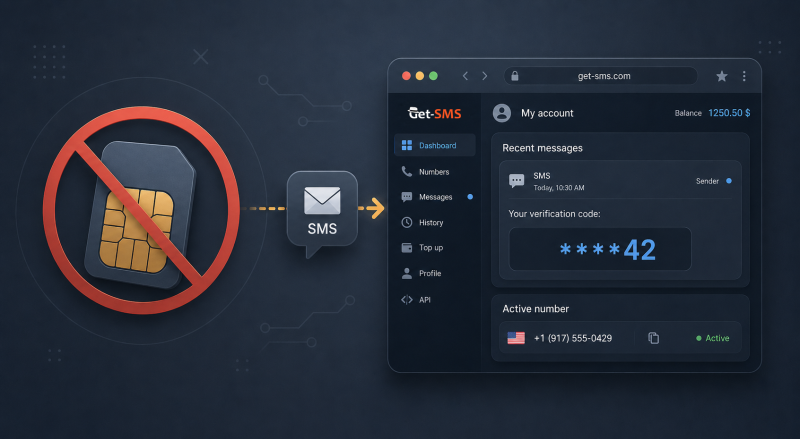
 An OTP (one-time password) is a code that confirms a single action - a sign-up, a login, or a payment - and stops working right after. Most platforms send OTP codes by SMS, so receiving one usually requires a SIM card. There is a way around that requirement: a virtual number receives the same SMS online and shows the code in a browser dashboard. This guide covers what an OTP is, how OTP verification works, why codes sometimes never arrive, and how to receive an OTP online without a SIM card or a second phone.
What OTP means
OTP stands for one-time password; the same abbreviation is sometimes read as one-time PIN or one-time passcode. Unlike a regular password, which you create and reuse, an OTP is generated by the platform and works once, within a short window. SMS codes typically stay valid for 5-15 minutes; codes from authenticator apps refresh every 30 seconds. A used or expired code is useless to anyone who intercepts it - that is the point of the format.
How does OTP verification work
The sequence is the same on almost every platform. You trigger an action that needs confirmation: registration, login from a new device, a password reset, a transfer. The platform generates a random code, stores it, and sends it through a channel linked to you. You enter the code in the form, and the server compares it with the stored one and checks that the time window has not closed.
The channel varies:
- SMS to a phone number - the default at sign-up and the reason most services ask for your number;
- an authenticator app (Google Authenticator, Authy) - generates codes on the device itself, no network needed;
- email, a push notification in the platform's own app, or a voice call that reads the code out loud.
Platforms prefer SMS for initial verification because a phone number is harder to create in bulk than an email address. That makes the number a basic authentication filter against bots and duplicate accounts.
OTP vs 2FA - what's the difference
2FA (two-factor authentication) is a login scheme: to get in, you present two different factors - usually a password (something you know) plus a code or a key (something you have). An OTP is one possible second factor, not a synonym for the scheme.
The two overlap but do not match. A code sent at sign-up to confirm your number is an OTP, but it is not 2FA: there is no second factor, the code is the only check. A password plus an SMS code at every login is 2FA that uses OTP. A password plus a hardware key is 2FA without any OTP at all.
Why didn't I receive my OTP code
Four causes account for most missing codes.
- The number was entered with a mistake. One wrong digit or a missing country code sends the SMS to someone else. Check the form first.
- The message was filtered on the way. Carrier spam filters and blocked-sender lists often catch the short codes platforms send verification codes from. Weak signal and full message storage add their share on older phones.
- The platform paused sending. After several code requests in a row, most services stop sending for minutes or hours. Request a new code once and wait - rapid retries extend the pause.
- The platform's anti-fraud system refused silently. The status says "sent", but nothing arrives and never will. Typical triggers: the country of your IP address does not match the country of the number, the device carries a history of banned accounts, or the browser profile looks suspicious. What helps: an IP address, system language, and time zone matching the number's country, and a clean browser profile without old cookies.
The full breakdown of every case, including carrier-side and platform-side checks, is in our guide on missing SMS verification codes.
How to receive an OTP online without a SIM card
A virtual number is a real mobile number hosted by a service instead of a SIM card in your phone. It receives SMS online: incoming messages appear in a browser dashboard. For the platform sending the code there is no difference - it sees a normal mobile number.
On Get-SMS it takes a few minutes:
- Sign up and top up your balance.
- Pick the service you need the code for and the country of the number.
- Enter the issued number in the platform's form and request the SMS.
- The code appears in your dashboard; type it into the form.
An activation stays open for 20 minutes, which is enough for a sign-up. If no SMS arrives, you cancel the number and pay nothing. If the platform may ask for codes again later - a login from a new device, a security check - rent the number instead: a rental keeps it assigned to you for up to 30 days.
Receive OTP for Telegram, WhatsApp, or Google
Numbers on Get-SMS are issued per service: a number taken for Telegram receives codes from Telegram, a number for WhatsApp - from WhatsApp, a number for Google - from Google services. The catalog covers messengers, email providers, social networks, and marketplaces; the price depends on the service and the country. If a platform rejects a specific number, take another one or switch the country.
Is it safe to use a virtual number for OTP
For receiving a code, yes: the SMS travels through the regular mobile network, and the code expires right after use. The risks sit elsewhere.
A one-time activation number returns to the pool after the order closes. Do not leave it as the only recovery method on an account you care about - move account recovery to your email or an authenticator app after sign-up. For accounts that re-verify regularly, a rental keeps the number yours for up to 30 days.
Free public numbers on open websites, often listed as disposable numbers, are the real hazard: thousands of people see the same inbox, and anyone can request a password reset on an account registered there. A private virtual number shows incoming SMS only to you and keeps your personal phone number out of sign-up forms - which is most of the privacy argument for using one.
A brief conclusion
An OTP is a one-time code that confirms a single action, most often delivered as an SMS verification code. A SIM card is not required to receive it: a temporary phone number takes the same messages online - a 20-minute activation for one code, a rental of up to 30 days for repeat ones. The list of supported services is in the Get-SMS catalog, and common questions about code delivery are answered in the FAQ.