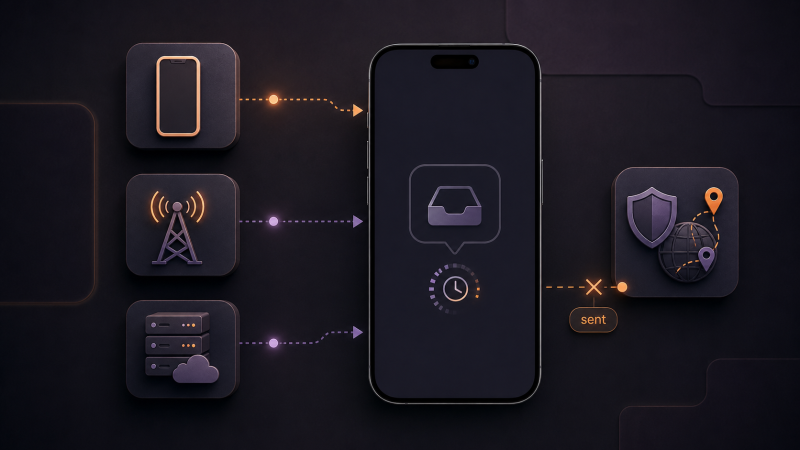
A missing SMS verification code usually comes down to one of four things: a mistake in the number, your phone or carrier filtering the message, a limit on the platform's side, or an anti-fraud system that silently refuses to send the code. Most cases can be fixed in a few minutes once you know where to look.
This guide goes from the most common causes to the least obvious ones, including situations where a service reports "SMS sent" but no message ever arrives.
Check the number and your phone first
Start with the form where you entered the number. One wrong digit or a missing country code sends the message to someone else's phone. Make sure the country code is complete and there is no extra zero after it.
Then check the phone itself:
- airplane mode is off and you have a signal. Weak coverage can delay an SMS;
- the sender is not blocked. Verification codes often come from short codes or alphanumeric senders, which spam filters may treat as bulk messaging;
- message storage is not full. On older phones, new SMS messages may stop arriving until old ones are deleted;
- the code went to the right SIM. On a dual-SIM phone, the message may be waiting on your second number.
If nothing obvious turns up, restart the phone. This reconnects the device to the network and can resolve a temporary connection problem.
Carrier-side causes
Your carrier can block a message even when the phone works fine. This can happen when a short code or service SMS blocking option is enabled on your plan, the carrier's spam filter catches the message, you are roaming abroad, or the network is congested.
Check your carrier account settings for SMS blocking options. If codes from one specific sender never arrive while other messages do, describe the case to carrier support. They may be able to confirm whether the message reached your number.
Platform-side causes
Sometimes the message is never sent. Most platforms limit repeated code requests: after several attempts in a row, sending is paused for minutes or hours. The only fix is to wait.
A platform may also restrict SMS delivery to your country or carrier, or its SMS gateway may be experiencing an outage. You cannot check this from the outside, but you can try an alternative if the site offers one: a voice call with the code, an email link, or in-app confirmation.
Anti-fraud checks
In some cases, the service reports that the SMS was sent, but the message never arrives. The platform's anti-fraud system may have flagged the signup and prevented delivery while still showing a normal "sent" status.
The most common triggers:
- your IP address country does not match the phone number's country. For example, a US number is used from a European IP address. The status says "SMS sent", but the code is not delivered;
- the device was previously used with banned accounts on that platform. The service recognizes it and refuses to send codes to a new number;
- the IP address, browser fingerprint, or cookies look suspicious to the platform. Shared proxies, old sessions, and traces of past signups can all raise flags.
What helps:
- match your IP address to the country of the number you are using;
- set the system language, time zone, and geolocation to the same country as the number. Mismatched locale data can trigger anti-fraud checks;
- use a clean browser profile without old cookies, or a clean OS with no signup history; for app-based signups, a quality device emulator with a fresh profile works better than a phone that already has banned accounts behind it.
How long to wait and when to request a new code
Most codes arrive within the first few minutes. If nothing comes, request a new code once, then wait. Do not tap the button repeatedly. Frequent requests can trigger rate limits, and after you request a new code, the previous one often stops working. If several messages arrive, use the code from the latest one.
If the code does not arrive on a virtual number
Virtual numbers add a few checks of their own:
- the order must be active. On Get-SMS, an activation stays open for 20 minutes, and the code appears in your dashboard within that window;
- the service and country in the order must match where you request the code. A number issued for one platform will not receive messages from another;
- the platform may reject a specific number. Try another number or a different country.
Free public numbers from open websites are a separate case. Thousands of people use them at once, so major platforms block them quickly, and the account you want may already be registered on that number. For anything that matters, use a number issued only to you.
If you got a number on Get-SMS and no message arrived within the order window, contact support. They can check whether an SMS reached the number.
How to receive a code with Get-SMS
- Sign up at Get-SMS or log in.
- Top up your balance.
- Pick the country and the service you need a code from.
- Enter the issued number on the platform and request the SMS.
- The code appears in your dashboard automatically.
If the platform may ask for re-verification later, consider renting the number instead: Get-SMS rentals keep a number assigned to you for up to 30 days.
When waiting will not help
In some situations there is no message to wait for. The platform may verify numbers only by voice call or in-app prompt, it may not support your chosen country, or the number may be blocked on the platform's side. The telltale sign: the code does not arrive after a pause, on a different number, and with a matching IP. At that point, switch the verification method or the number's country instead of waiting.
Summary
Work through the levels in order: the number and phone, then carrier settings, then platform limits. If the status says "sent" but nothing arrives, check for an anti-fraud issue. Match your IP, locale, and device profile to the number's country, and use a clean environment without banned-account history.
With a virtual number, also confirm that the order is active and that the service and country match. Skip free public numbers for important accounts because platforms often block them first.